
Skip to content
WagonWorks is on Microsoft Store. 30 days Free, then $39 a seat.See pricing →
WAGNWRKS
Log inBook a demoStart Free
Illustration: a farmhouse at dusk behind a fence

The Estate · AI for wealth managers and RIAs

Household reviews and estate documents, kept current.

For financial advisors, wealth managers and RIAs: which reviews are overdue, which beneficiary and trust documents have gone stale, and which policy exceptions have quietly stuck around, tracked in the Microsoft 365 your firm already runs on. The family's whole picture stays there, and no investment decision is ever the machine's.

WHO BUILT IT
Built by The Lobbi Corp. in Roseville, California. Listed on Microsoft Store. Runs inside the Microsoft 365 tenant your firm already has.
Meet the team →
WHAT IT WON’T DO
It won’t give investment advice, place a trade or change an account. It finds the record, shows you the source, and your advisors decide.
Advice and trading stay with your advisors.
01

From the question to a checked next step.

FICTIONAL WORKFLOW EXAMPLE · NOT A CUSTOMER RESULT
1
Ask
"Find the notes from the last Morales household review and draft a note asking for the updated trust documents."
2
Find the source
Example inputs: review notes in SharePoint and the household's emails in the Outlook your Microsoft account can access.
3
Review
Open the named review notes. Confirm the household, the documents still outstanding and the recipient before approving the note.
4
Approve and check
Approve the send only after review, then check the result. Advice, trades and account decisions stay with the advisor.
DATA

Advisors already use AI. Their firms haven't built it in.

63%
of independent RIAs use AI tools in some capacity, more than double since 2023
1 in 10
advisors using AI have fully built it into their business strategy
82%
of AI users rely on generative AI, mostly individual experimenting rather than firm-wide systems
68%
expect AI to transform financial advice within three years
02

What it does in your day

FICTIONAL CLIENTS · DEMO DATA
ANSWERED FROM YOUR FILES

Ask in plain words. See where it looked.

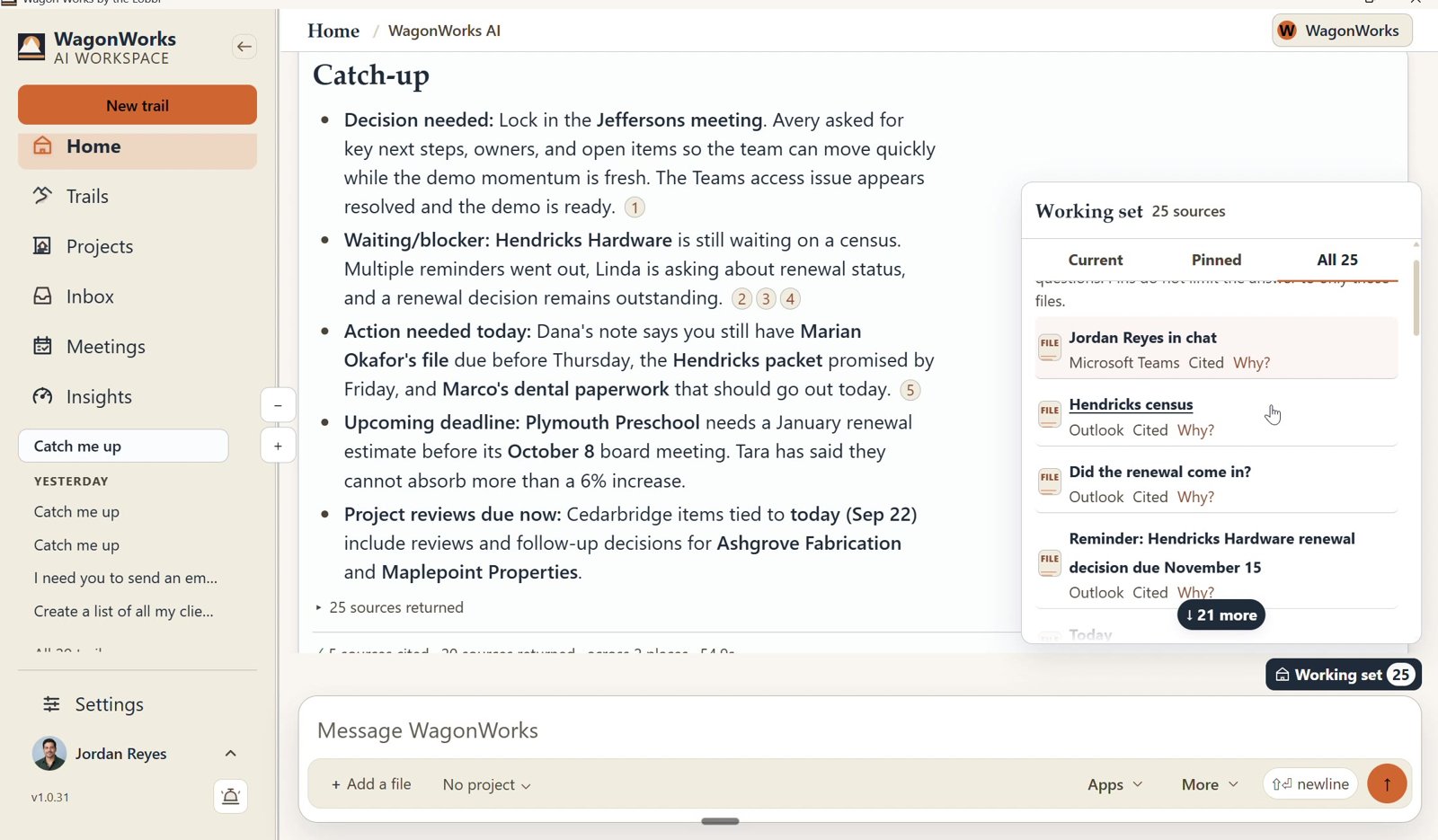
"What did the Morales household ask for at their last review?" WagonWorks answers from your own email, notes and files, with numbered sources you can open.
LIMITIt only sees what your Microsoft account can already see. Custodian platforms are outside it.
Screenshot: WagonWorks v1.0.31 · Working set: every source the answer used
REAL CAPTURE · WagonWorks v1.0.31 · Working set: every source the answer used · demo data, fictional names
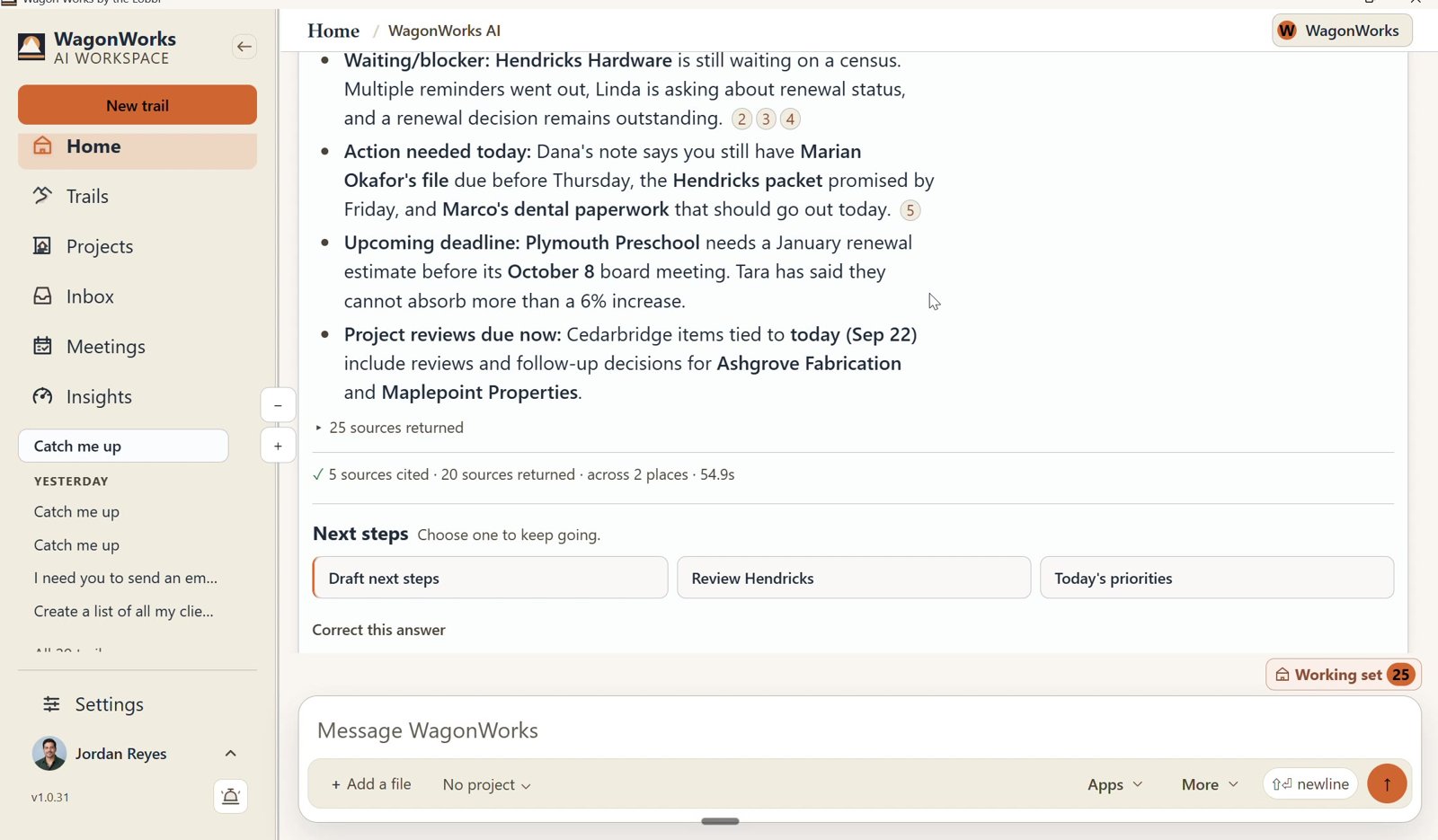
Screenshot: WagonWorks v1.0.31 · Catch me up with numbered sources
REAL CAPTURE · WagonWorks v1.0.31 · Catch me up with numbered sources · demo data, fictional names
WHO NEEDS YOU TODAY

Press Catch me up.

Which households still owe paperwork before year-end, which reviews are this week, and what you promised to send after the last meeting.

LIMITIt works from your mail and Planner. A promise made on the phone and never written down won't appear.
FROM A SENTENCE TO A DOCUMENT

Walk into the review with a one-page summary, in Word.

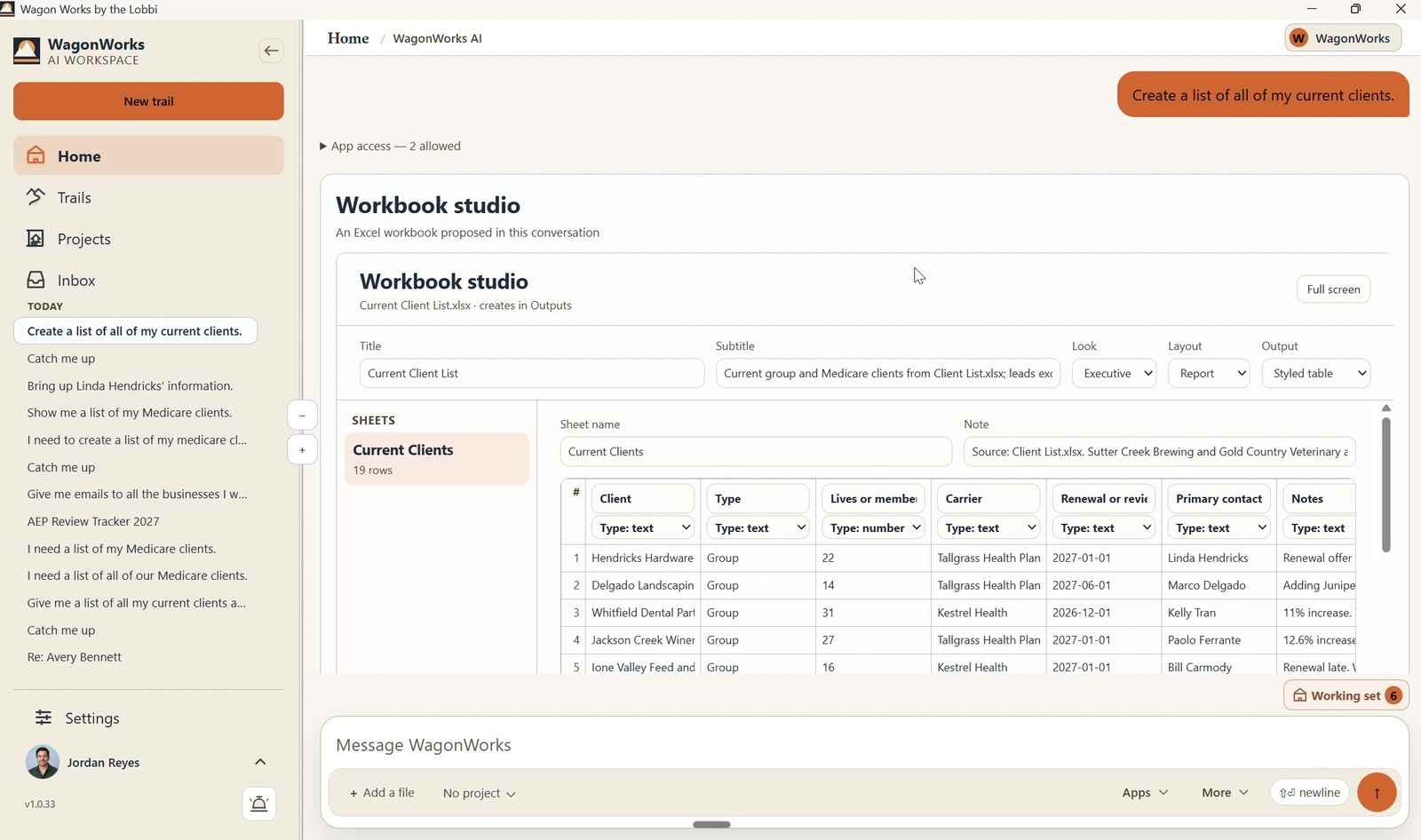
Ask for review prep and WagonWorks builds a sectioned Word document from your notes and correspondence, saved to your SharePoint.
LIMITIt summarizes your files. It never gives investment advice or recommends a trade.
Screenshot: WagonWorks v1.0.33 · Workbook studio building an Excel file
REAL CAPTURE · WagonWorks v1.0.33 · Workbook studio: the same studio, building an Excel file · demo data, fictional names
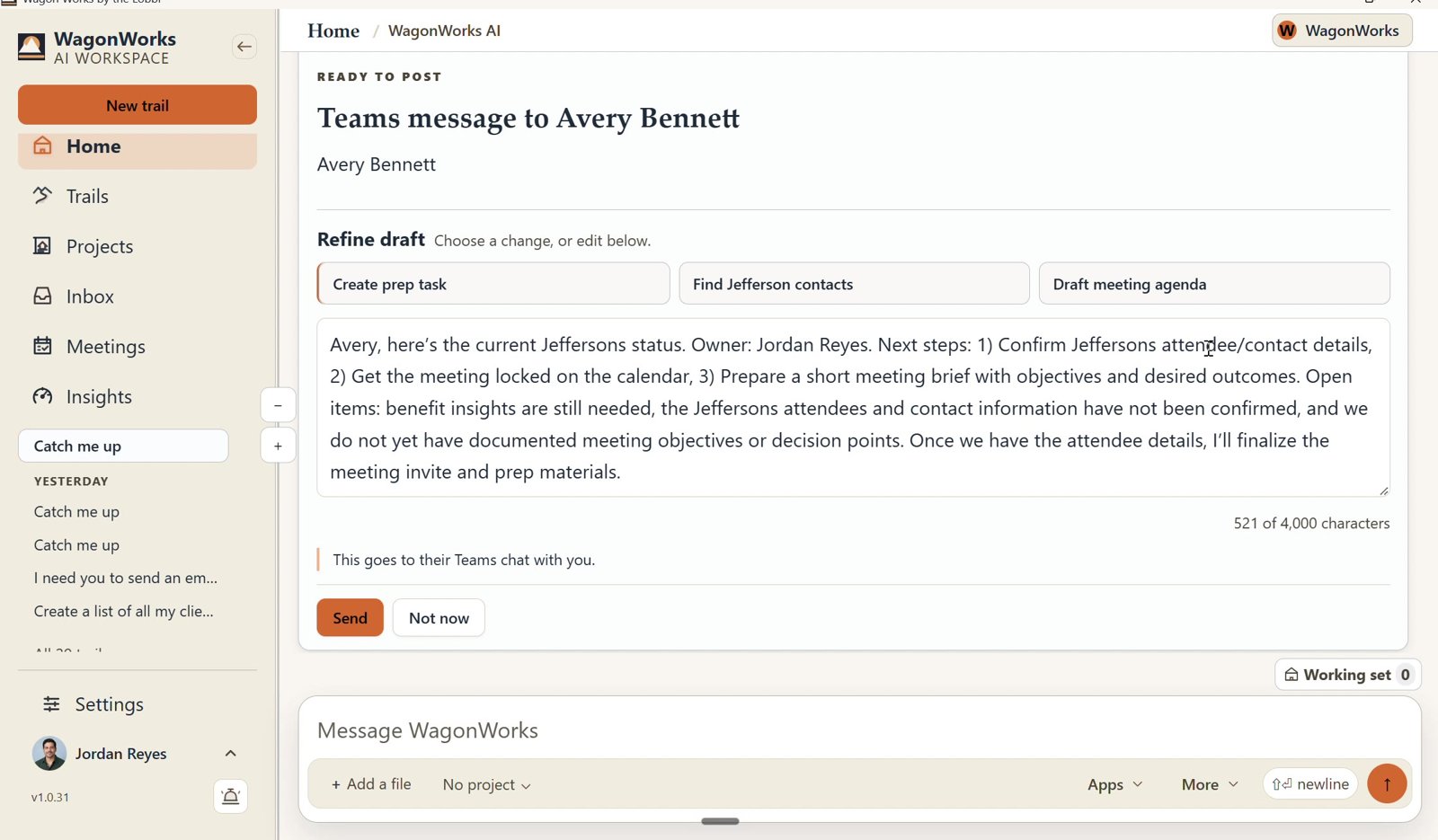
Screenshot: WagonWorks v1.0.31 · Ready to post: Send or Not now
REAL CAPTURE · WagonWorks v1.0.31 · Ready to post: Send or Not now · demo data, fictional names
YOU APPROVE. EVERY TIME.

It drafts the follow-up. Nothing goes out until you say so.

It drafts the follow-up after the review. A Ready to send card shows the recipient and the draft; it sends from your own Outlook mailbox, as you, only when you say so.

LIMITApproval is yours, and so is what you send.
It also turns a sentence into a Planner task. "Send the Chen household the beneficiary forms by Friday." You confirm the details before it's added.
Try it on this quarter's reviews.
Free for 30 days, then $39 per seat per month. Cancel any time.
03

Built for your season

Q4: THE YEAR-END RUN

Required minimum distributions by December 31. Tax-loss harvesting and Roth conversions on the same clock. Every household review stacks into one quarter.

JANUARY: THE CALLS

Consolidated 1099s go out and clients start calling. WagonWorks tells you who is waiting and drafts the reply for you to approve.

04

What stays with you

It only sees what you can already see.
It runs on each person's own Microsoft sign-in, with the permissions they already have.
We don't collect your information.
Client files stay in your Microsoft 365. Nothing is copied into a WagonWorks database, and nothing trains on it.
No advice. No trades. No custodial access.
WagonWorks never gives investment advice, places a trade or touches a client's custodial account.
Email sends from your own mailbox.
Approved messages go out from your Outlook, the same way you send today.
A person approves everything.
Every email, document and task is shown to you first.
05

Questions you will ask

Does it work with my CRM?

Yes, when your CRM is connected to your Microsoft 365. Whatever reaches your Outlook, Teams, Planner, SharePoint or OneDrive, WagonWorks can use.

Does it change how my email is kept?

No. It sends from your own Outlook mailbox, so messages stay in your Microsoft 365 the way yours do today.

Does it give advice or place trades?

No. It stays in the back office. It never gives advice, touches a trade or accesses a custodial account.

Do I need to buy Microsoft 365 Copilot?

No. It runs on the Copilot Chat included in Business Standard, Business Premium and Enterprise E3/E5. Business Basic on its own will not work.

What does it cost?

Free for 30 days, then $39 per seat per month, month to month. Cancel any time.

NEXT STEP

Your clients trust you with their plans. Keep every promise you made them.

Free for 30 days, then $39 per seat per month. Cancel any time.
Keep reading: What it does · Pricing · FAQ