
Skip to content
WagonWorks is on Microsoft Store. 30 days Free, then $39 a seat.See pricing →
WAGNWRKS
Log inBook a demoStart Free
Illustration: a stagecoach and horse at a hitching post

The General Store · AI for small businesses on Microsoft 365

Less hunting through files. More time for the work.

For small businesses of up to 50 people on Microsoft 365: find the file, catch up on the inbox, and draft the next reply or task. A person on your team checks the source and approves the next step. Your files stay in your tenant; the AI receives only the excerpts an answer needs.

WHO BUILT IT
Built by The Lobbi Corp. in Roseville, California. Listed on Microsoft Store. Runs inside the Microsoft 365 tenant your company already has.
Meet the team →
WHAT IT WON’T DO
It won’t set a price, sign a contract or send anything on its own. It finds the record, shows you the source, and your team decides.
Prices and promises stay with your team.
01

From the question to a checked next step.

FICTIONAL WORKFLOW EXAMPLE · NOT A CUSTOMER RESULT
1
Ask
"Find the signed quote for Ridgeline Landscaping and draft a follow-up asking when they want to start."
2
Find the source
Example inputs: a quote in SharePoint and the email thread your Microsoft account can access.
3
Review
Open the named quote. Confirm the customer, amount and date, then check the draft and recipient.
4
Approve and check
Approve the follow-up only when it is correct. Verify the action result; price and terms stay your decision.
DATA

Small businesses already use AI. Their inboxes haven't caught up.

58%
of U.S. small businesses use generative AI, up from 40% a year earlier
84%
plan to increase their use of technology platforms
117
emails a day reach the average worker, most skimmed in under a minute
275
interruptions a day from meetings, email and chat: one every 2 minutes
02

What it does in your day

FICTIONAL CUSTOMERS · DEMO DATA
ANSWERED FROM YOUR FILES

Ask in plain words. See where it looked.

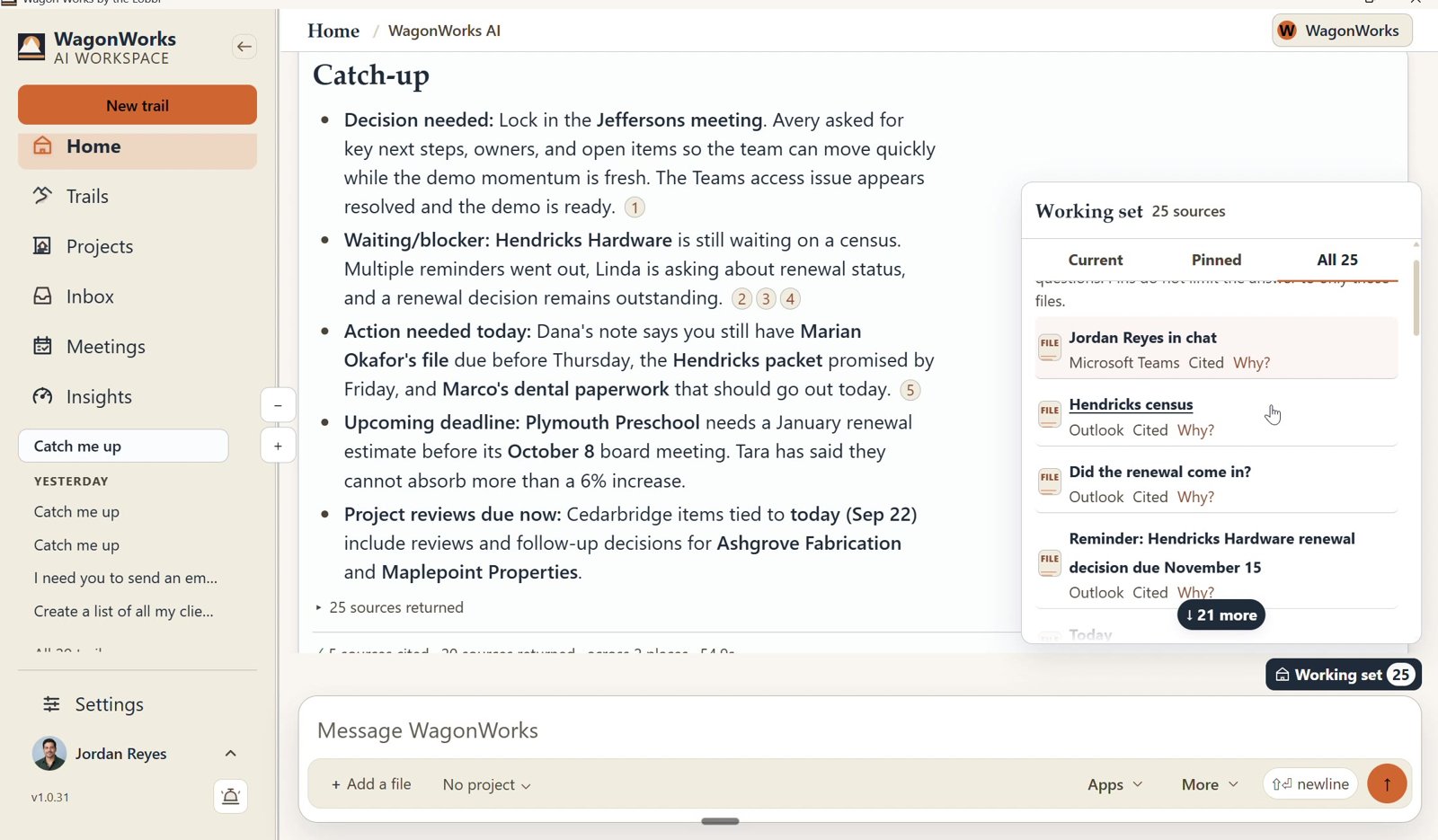
"Which customers asked for a quote this week and haven't heard back?" WagonWorks answers from your own email and files, with numbered sources you can open.
LIMITIt only sees what your Microsoft account can already see. Other software is outside it unless it sends to your Microsoft 365.
Screenshot: WagonWorks v1.0.31 · Working set: every source the answer used
REAL CAPTURE · WagonWorks v1.0.31 · Working set: every source the answer used · demo data, fictional names
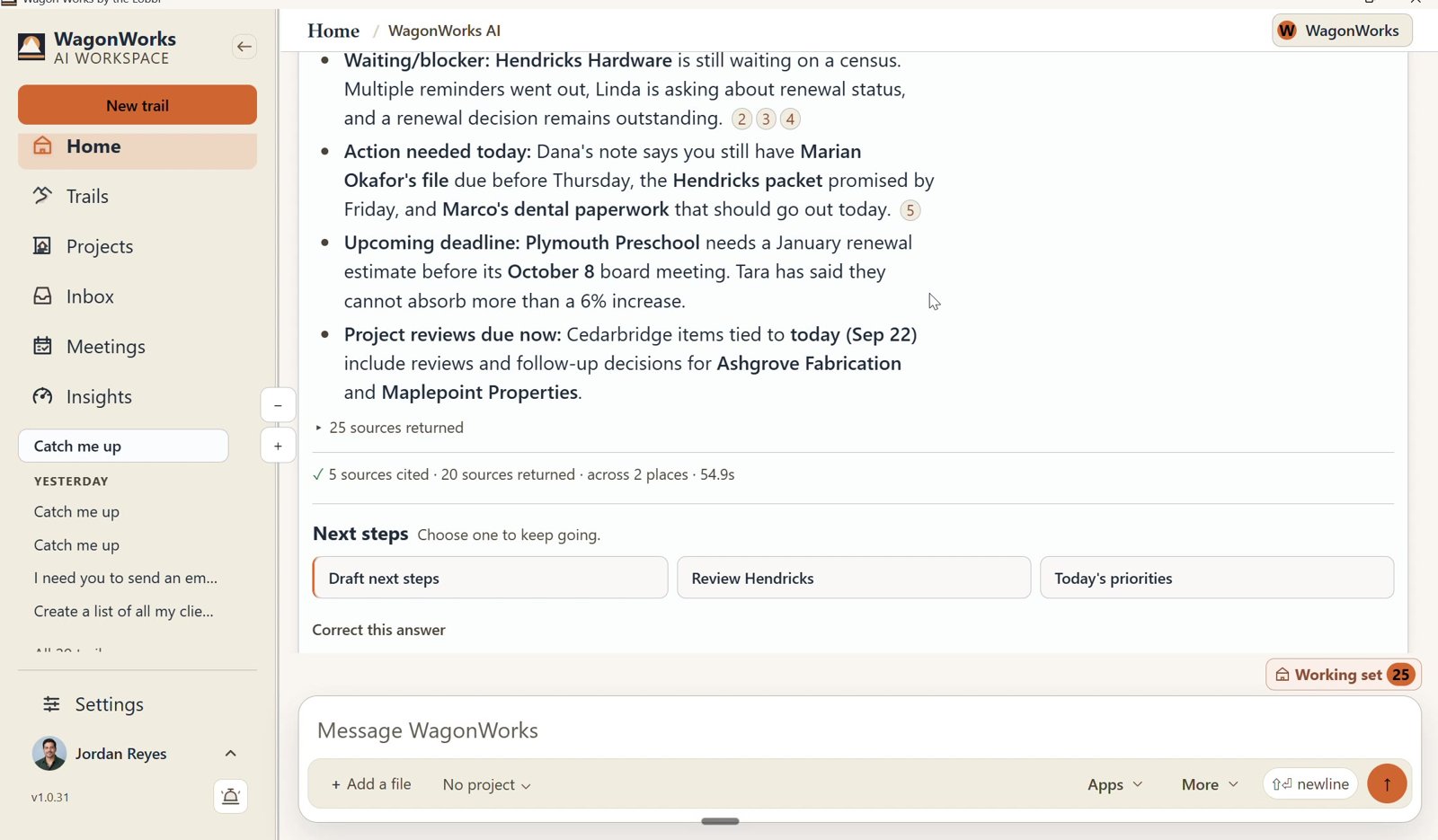
Screenshot: WagonWorks v1.0.31 · Catch me up with numbered sources
REAL CAPTURE · WagonWorks v1.0.31 · Catch me up with numbered sources · demo data, fictional names
WHO NEEDS YOU TODAY

Press Catch me up.

Unanswered customers, quotes waiting on a reply, invoices someone asked about and the people who have written twice this week.

LIMITIt works from your mail and Planner. A promise made on the phone and never written down won't appear.
FROM A SENTENCE TO A DOCUMENT

Need a proposal? It builds the document, in Word.

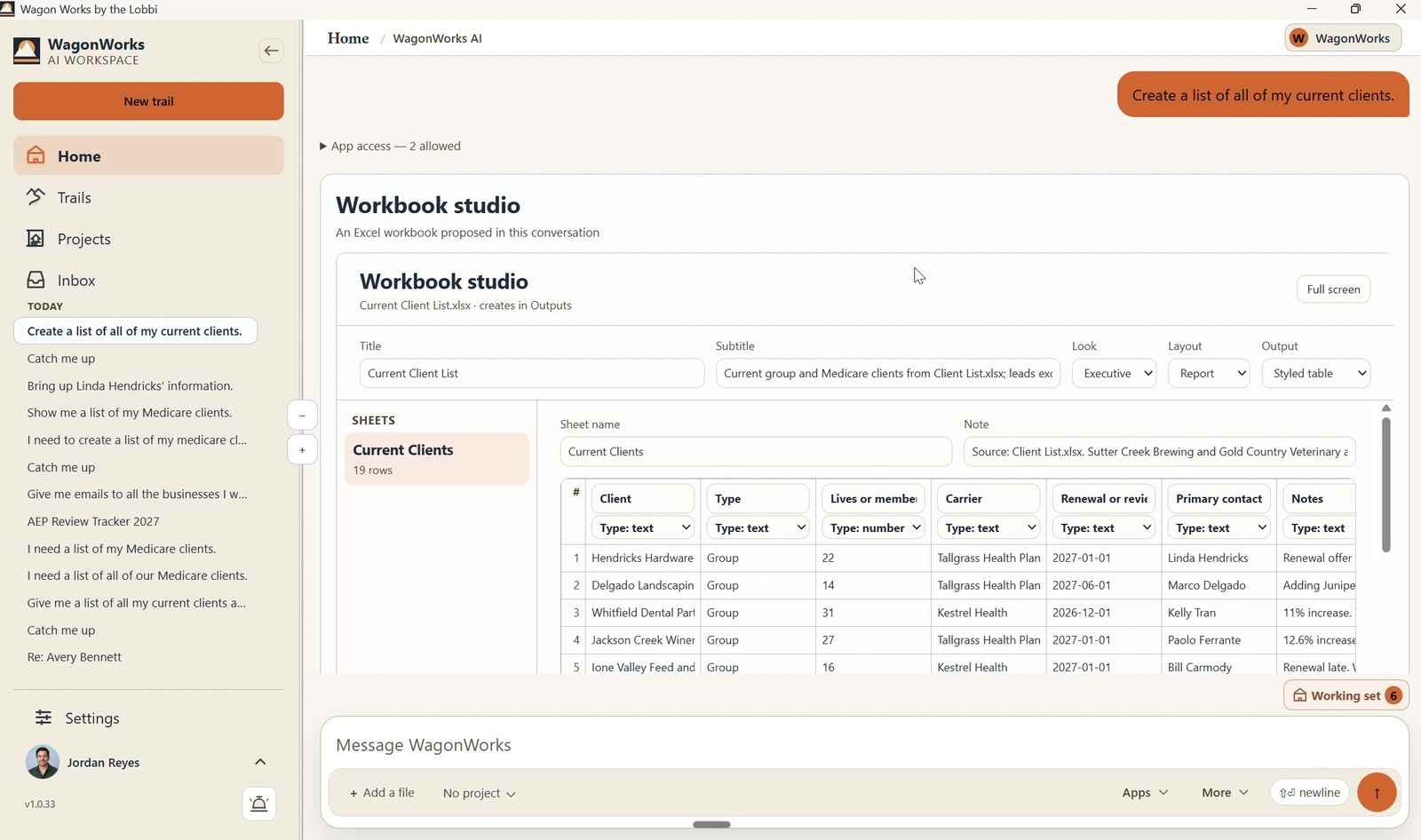
Ask for a customer proposal or a new-hire welcome letter. WagonWorks builds a sectioned Word document from your files and saves it to your SharePoint.
LIMITIt summarizes your files. It never sets a price or signs anything for you.
Screenshot: WagonWorks v1.0.33 · Workbook studio building an Excel file
REAL CAPTURE · WagonWorks v1.0.33 · Workbook studio: the same studio, building an Excel file · demo data, fictional names
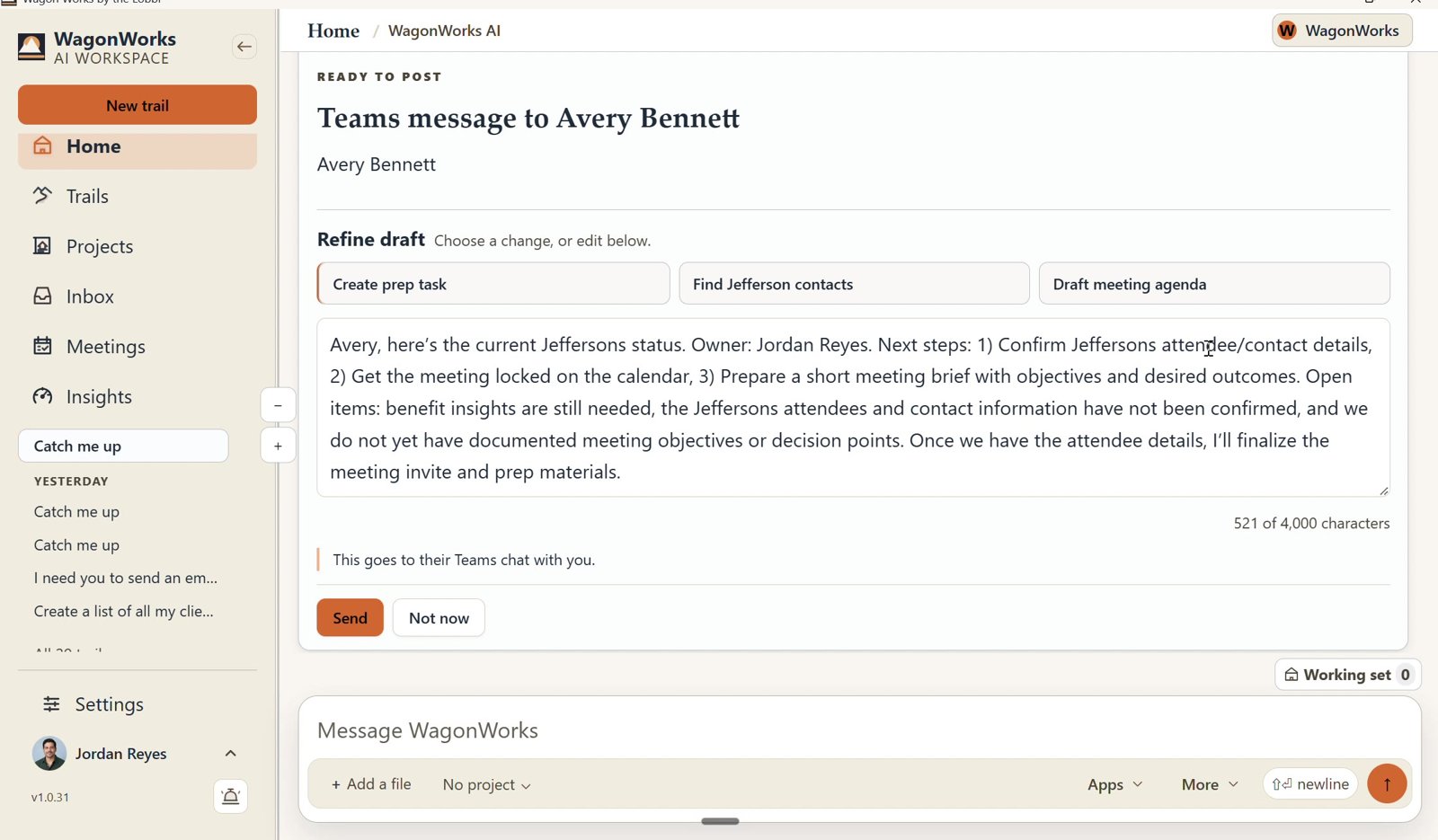
Screenshot: WagonWorks v1.0.31 · Ready to post: Send or Not now
REAL CAPTURE · WagonWorks v1.0.31 · Ready to post: Send or Not now · demo data, fictional names
YOU APPROVE. EVERY TIME.

It drafts the follow-up. Nothing goes out until you say so.

It drafts the customer reply or the reminder. A Ready to send card shows the recipient and the draft; nothing goes out until you say so.

LIMITApproval is yours, and so is what you send.
It also turns a sentence into a Planner task. "Remind Dana to send the Ridgeline invoice by Friday." You confirm the details before it's added.
Try it on this week's inbox.
Free for 30 days, then $39 per seat per month. Cancel any time.
03

Built for the week you actually have

MONDAY MORNING

The weekend's email, Friday's loose ends and the customer who wrote twice. Catch me up puts them in order before the first call.

MONTH END

Invoices, renewals and the document someone asked for three weeks ago. WagonWorks finds it, drafts the note and adds the task.

04

What stays with you

It only sees what you can already see.
It runs on each person's own Microsoft sign-in, with the permissions they already have.
We don't collect your information.
Customer files stay in your Microsoft 365. Nothing is copied into a WagonWorks database, and nothing trains on it.
No prices. No promises.
WagonWorks never sets a price, signs a contract or replaces your accounting and customer software.
A person approves everything.
Every email, document and task is shown to you first.
05

Questions you will ask

Does it work with my accounting or CRM software?

Yes, when it is connected to your Microsoft 365. Whatever reaches your Outlook, Teams, Planner, SharePoint or OneDrive, WagonWorks can use.

Can it read customer documents?

Yes, the ones your account can already open in your Microsoft 365. We don't collect or store any of it.

Will it replace anyone on my team?

No. It helps your team with the work around the job: finding documents, catching up and drafting messages. People make the decisions.

Do I need to buy Microsoft 365 Copilot?

No. It runs on the Copilot Chat included in Business Standard, Business Premium and Enterprise E3/E5. Business Basic on its own will not work.

NEXT STEP

Spend the week on the work, not the chase.

Free for 30 days, then $39 per seat per month. Cancel any time.
Keep reading: What it does · Pricing · FAQ