
Skip to content
WagonWorks is on Microsoft Store. 30 days Free, then $39 a seat.See pricing →
WAGNWRKS
Log inBook a demoStart Free
Illustration: a job trailer, a hard hat and a tower crane on an open site

The Jobsite · AI for construction and the trades

Find the submittal before the crew needs it.

For general contractors, subcontractors and trades like electrical, plumbing, HVAC and concrete, all working in Microsoft 365: find the drawing, the approved submittal or the RFI answer, catch up on a job thread, and draft the next reply. Your files stay in your tenant; the AI receives only the excerpts an answer needs. Your people check the source and decide what happens next.

BUILT BY
Five founders in Roseville, California, building for small teams that run on Microsoft 365, from the office to the field trailer.
Meet the team →
WHAT IT WON’T DO
It won’t approve a submittal, price a change order or tell you a drawing is current. It finds the record, shows you the source, and your people decide.
Approvals, pricing and safety stay with your people.
01

From the question to a checked next step.

FICTIONAL WORKFLOW EXAMPLE · NOT A CUSTOMER RESULT
1
Ask
"Find the approved submittal for the Ridgeline Clinic storefront and draft a note to the architect asking where RFI 042 stands."
2
Find the source
Example inputs: the submittal log in SharePoint and the architect’s emails in Outlook.
3
Review
Open the named submittal. Check the revision, the approval stamp, the recipient and the attachment before approving the note.
4
Approve and check
Approve the send only after review, then inspect the action result. Approvals, pricing and safety calls stay with your people.
DATA

Crews lose a day a week to looking for things.

5.5 hrs
a week, per person, spent searching for project data and information
48%
of all rework traced to miscommunication and poor project information
85%
of contractors expect AI to cut the time spent on repetitive tasks
57%
name reliability and accuracy of AI output as a chief concern, so every answer names its source
02

What it does in your day

FICTIONAL CLIENTS · DEMO DATA
ANSWERED FROM YOUR FILES

Ask in plain words. See where it looked.

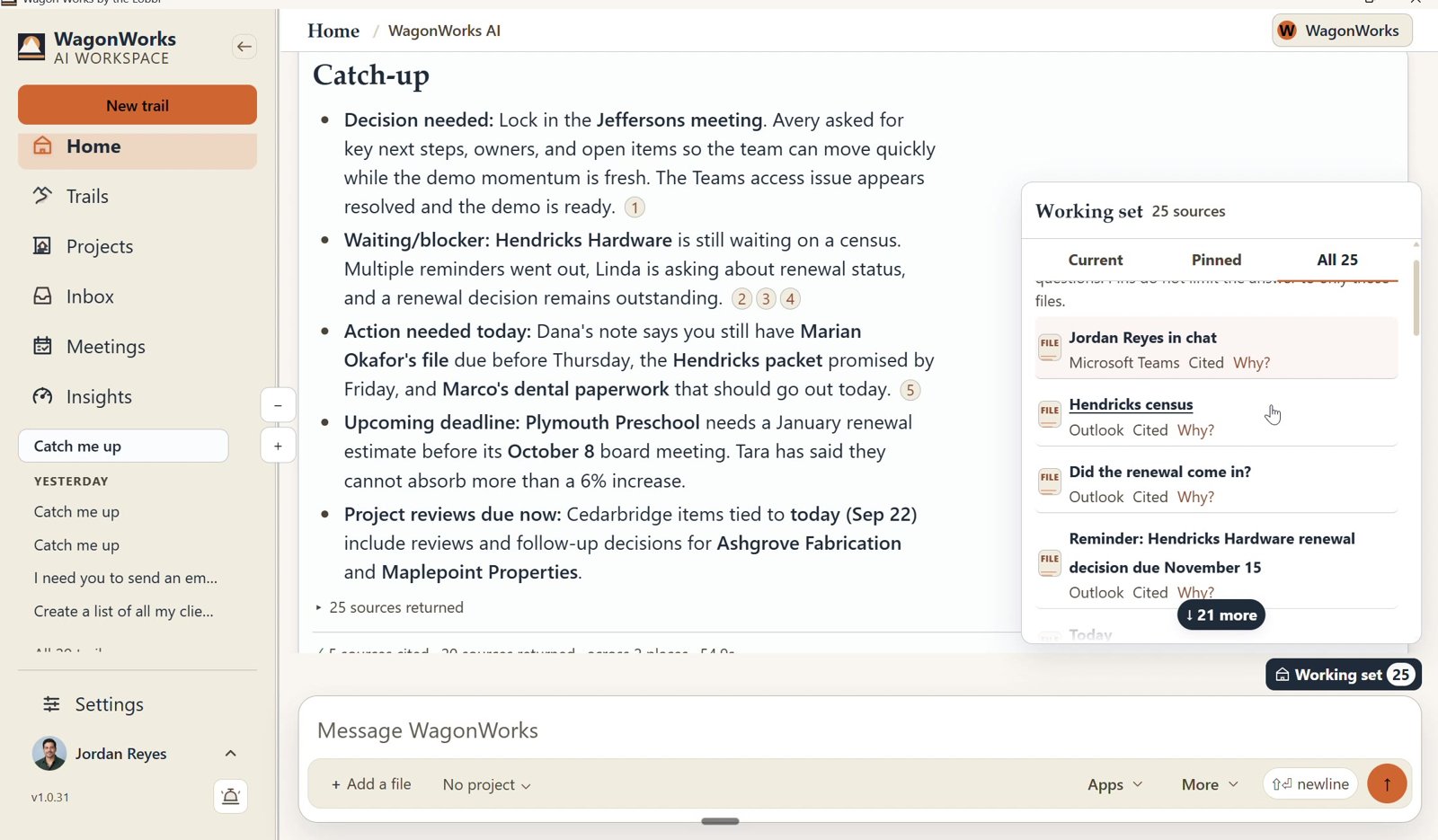
"What changed on the Ridgeline job this week, and who is waiting on us?" WagonWorks answers from your own email and files. Each point carries a numbered source; click one to open the original in Outlook or Planner.
LIMITIt only sees what your Microsoft account can already see. Procore and other project systems are outside it unless they send to your Microsoft 365.
Screenshot: WagonWorks v1.0.31 · Working set: every source the answer used
REAL CAPTURE · WagonWorks v1.0.31 · Working set: every source the answer used · demo data, fictional names
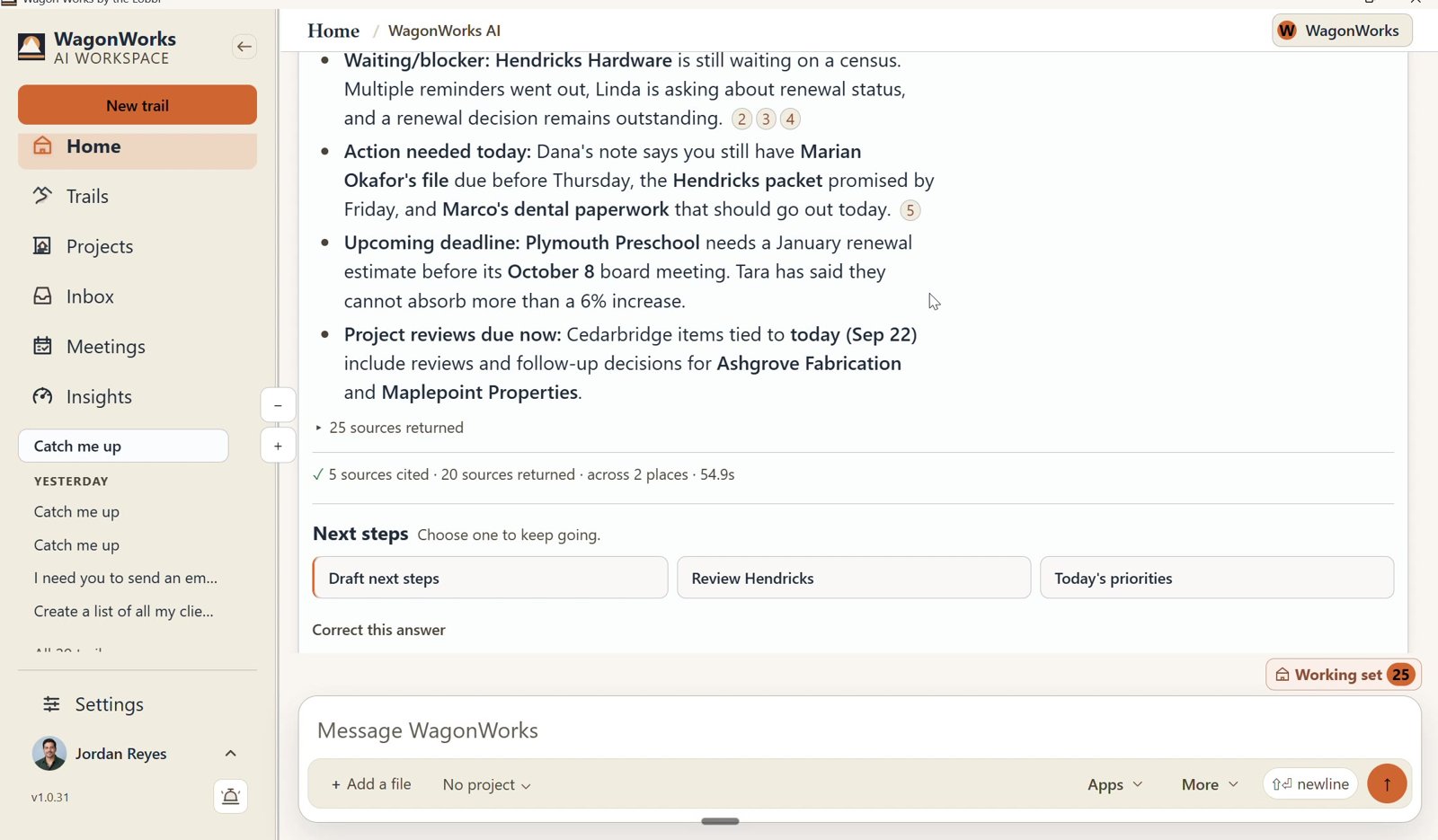
Screenshot: WagonWorks v1.0.31 · Catch me up with numbered sources
REAL CAPTURE · WagonWorks v1.0.31 · Catch me up with numbered sources · demo data, fictional names
WHO NEEDS YOU TODAY

Press Catch me up.

Decisions waiting on you, subs waiting on an answer, what has to happen today, and the deadlines coming up. The storefront submittal is still with the architect. The pay app for Ridgeline is due Friday.

LIMITIt works from your mail and Planner. A promise made on the jobsite and never written down won't appear.
FROM A SENTENCE TO A DOCUMENT

Need an owner report? It builds the document, in Word.

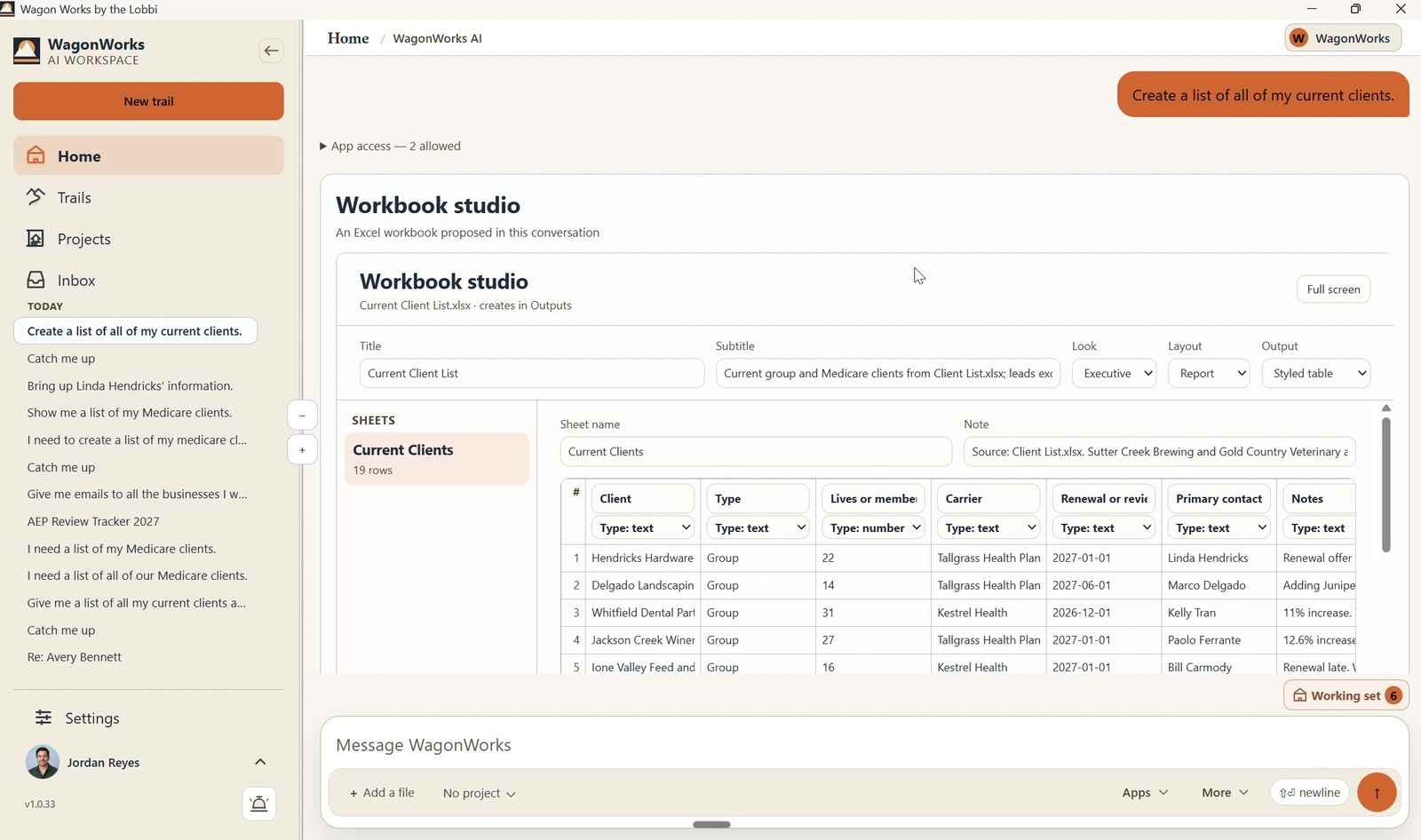
Ask for this week’s owner report for the Ridgeline Clinic job. WagonWorks builds a sectioned Word document from your files and saves it to your SharePoint.
LIMITIt summarizes your files. It does not price work or certify a drawing is current. Check every number against the source documents.
Screenshot: WagonWorks v1.0.33 · Workbook studio building an Excel file
REAL CAPTURE · WagonWorks v1.0.33 · Workbook studio: the same studio, building an Excel file · demo data, fictional names
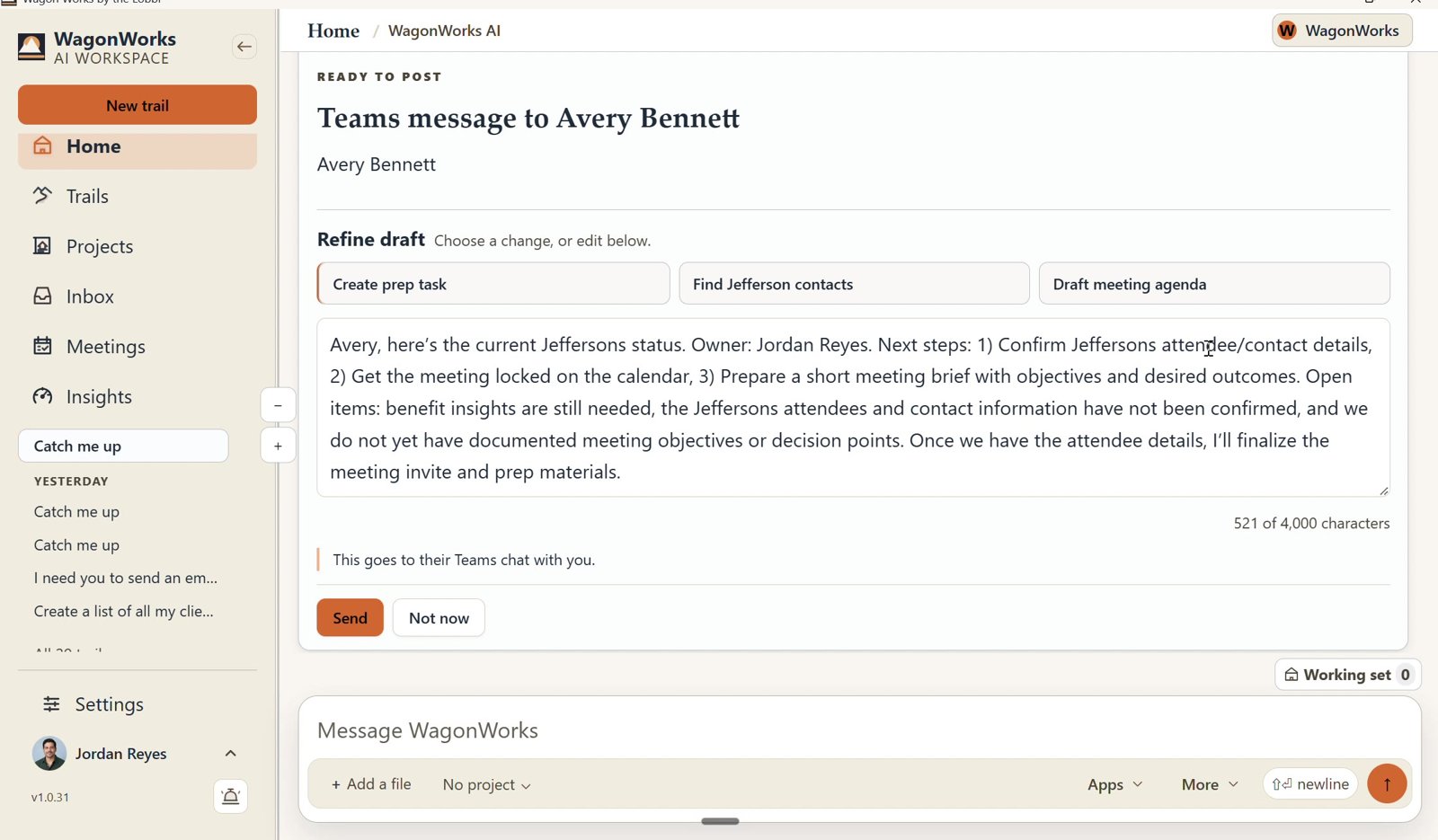
Screenshot: WagonWorks v1.0.31 · Ready to post: Send or Not now
REAL CAPTURE · WagonWorks v1.0.31 · Ready to post: Send or Not now · demo data, fictional names
YOU APPROVE. EVERY TIME.

It drafts the follow-up. Nothing goes out until you say so.

A Ready to send card shows the recipient and a draft you can edit, and tells you plainly: "It sends from your mailbox, as you." Choose Send or Not now.

LIMITApproval is yours, and so is what you send.
It also turns a sentence into a Planner task. "Get the revised door schedule to Marco before Tuesday’s walk." You confirm the details before it's added.
Try it on this week's jobs.
Free for 30 days, then $39 per seat per month. Cancel any time.
03

Built for the job, not the desk

BID DAY

The bid is due Friday. The addenda came by email, the plans sit in a Teams channel and the sub quotes are in three inboxes. WagonWorks pulls them into one answer you can check.

ON SITE

The foreman needs the latest approved submittal and the RFI answer before the pour. Ask from the trailer and open the source before acting. It needs an internet connection; it is not an offline field app.

04

What stays with you

It only sees what you can already see.
It runs on each person's own Microsoft sign-in. If you can't open a folder today, you can't see it through WagonWorks.
Your files stay in your Microsoft 365.
New documents are saved in your own SharePoint. WagonWorks trains nothing on your files.
We don't collect your information.
WagonWorks works with what is already in your Microsoft 365. Nothing is copied into a WagonWorks database.
A person approves everything.
Every email, message, document and task is shown to you first.
Approvals, pricing and safety stay with your people.
WagonWorks does not approve submittals, price work, sign pay apps or replace your project management or accounting software.
05

Questions you will ask

Can it read our drawings and specs?

Yes, if they're in your Microsoft 365. It works with the PDFs, Word and Excel files, emails and tasks your account can already open, under your own permissions. Check the revision in the source before using it on the job.

Can the crew use it in the field?

It runs in the Windows desktop app and needs an internet connection, including in the trailer. It is not a phone app or an offline field app today. Each seat covers 2 devices.

Does it work with Procore or our project management software?

Whatever that system sends to your Microsoft 365, such as notification emails, exported logs and synced folders, WagonWorks can use. It does not connect to Procore or other project systems directly.

Do I need to buy Microsoft 365 Copilot?

No. It runs on the Copilot Chat already included in Business Standard, Business Premium and Enterprise E3/E5. Business Basic on its own will not work.

What does it cost?

Free for 30 days, then $39 per seat per month plus tax, month to month. $0 is due today; a card is required at checkout. Cancel before the trial ends to avoid a charge.

NEXT STEP

You already know the job. We just know the trail.

Free for 30 days, then $39 per seat per month. Cancel any time.
Keep reading: What it does · Pricing · FAQ