
Skip to content
WagonWorks is on Microsoft Store. 30 days Free, then $39 a seat.See pricing →
WAGNWRKS
Log inBook a demoStart Free
Illustration: a tent and a lit assay office under the stars

The Assay Office · AI for Medicare and group benefits brokers

Find the file before the client calls again.

For Medicare and group benefits brokers working in Microsoft 365: find the census, catch up on a renewal thread, and draft the next reply. Your files stay in your tenant; the AI receives only the excerpts an answer needs. Your team reviews the source and decides what happens next.

BUILT WITH BROKERS
Co-founder Rosamaria Marrujo founded Trusted American Insurance Agency, a Medicare FMO that supports 6,000+ agents, and is Past President of CAHIP.
Meet the team →
WHAT IT WON’T DO
It won’t quote a premium, recommend a plan or enroll a client. It finds the record, shows you the source, and your licensed team decides.
Coverage decisions stay with your licensed team.
01

From the question to a checked next step.

FICTIONAL WORKFLOW EXAMPLE · NOT A CUSTOMER RESULT
1
Ask
"Find the latest employee census for Hendricks Hardware and draft a note to Linda asking for the updated one."
2
Find the source
Example inputs: the census file in SharePoint and Linda Hendricks's emails in Outlook.
3
Review
Open the named census. Check the group, the date, the recipient and the attachment before approving the note.
4
Approve and check
Approve the send only after review, then inspect the action result. Coverage and policy decisions stay with your licensed team.
DATA

Agents already use AI. Their agencies haven't bought it.

65%
of independent agents used AI for work in the past year, up from 37%
14%
of agencies have put an AI tool in place
72%
of health, Medicare and benefits agents want renewal reminders from AI
74%
want a person to approve before anything reaches a client
02

What it does in your day

FICTIONAL CLIENTS · DEMO DATA
ANSWERED FROM YOUR FILES

Ask in plain words. See where it looked.

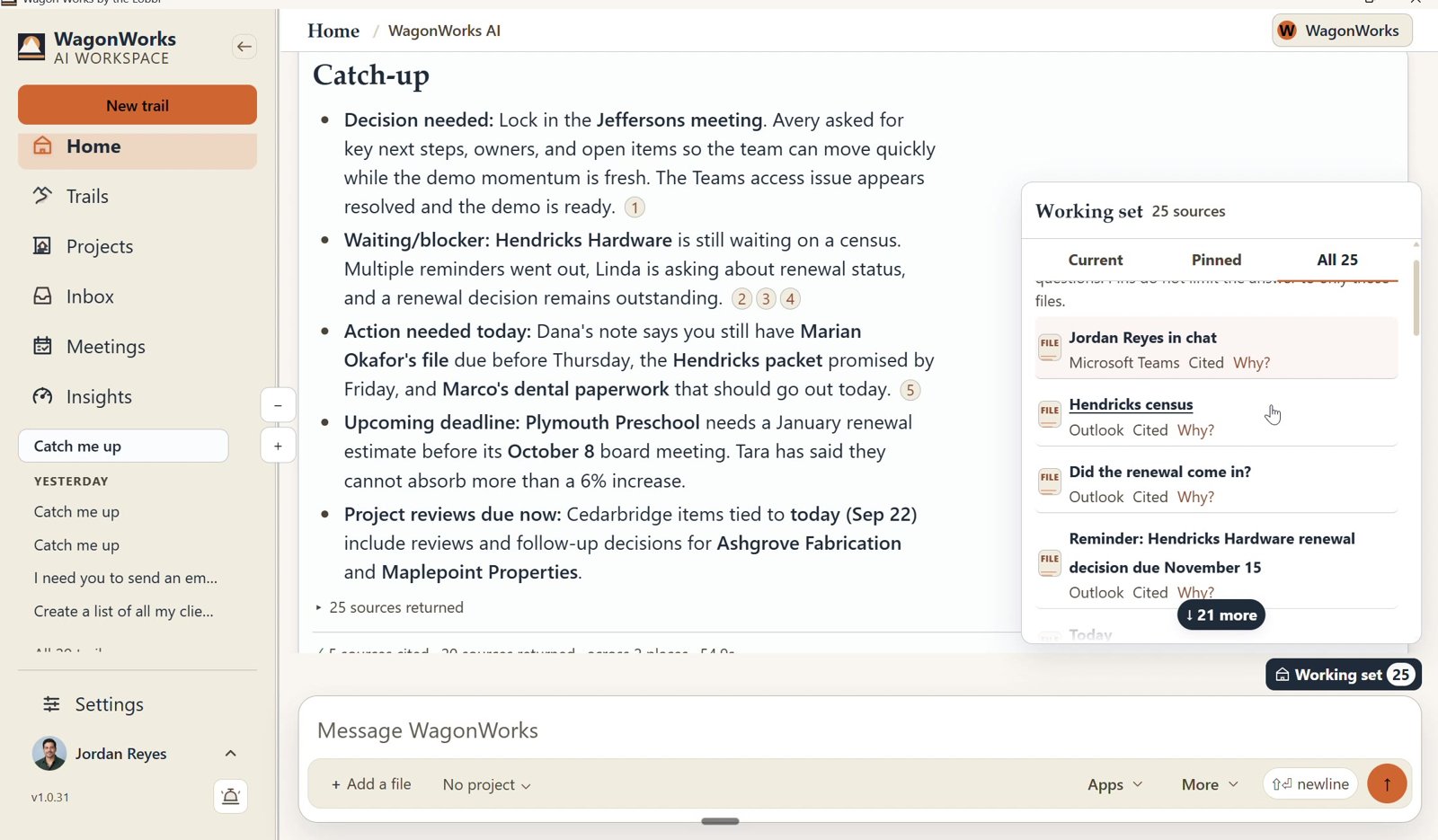
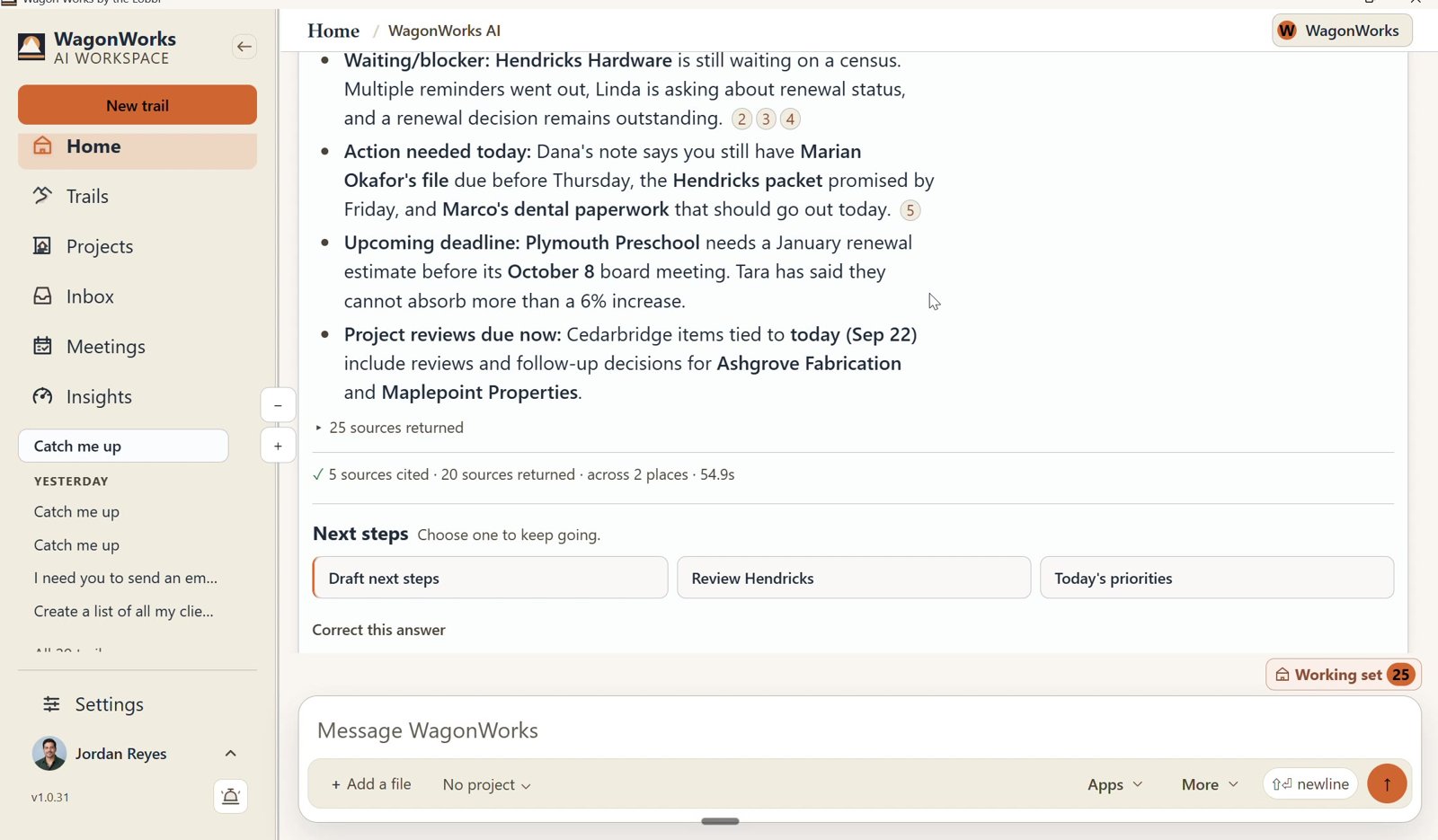
"Who do I need to call this week, and what are they waiting on?" WagonWorks answers from your own email and files. Each point carries a numbered source; click one to open the original in Outlook or Planner.
LIMITIt only sees what your Microsoft account can already see. Carrier portals are outside it.
Screenshot: WagonWorks v1.0.31 · Working set: every source the answer used
REAL CAPTURE · WagonWorks v1.0.31 · Working set: every source the answer used · demo data, fictional names
Screenshot: WagonWorks v1.0.31 · Catch me up with numbered sources
REAL CAPTURE · WagonWorks v1.0.31 · Catch me up with numbered sources · demo data, fictional names
WHO NEEDS YOU TODAY

Press Catch me up.

Decisions waiting on you, clients waiting on something, what has to happen today, and the deadlines coming up. Hendricks Hardware still owes the census for its renewal. Marian Okafor's file is due before Thursday.

LIMITIt works from your mail and Planner. A promise made on the phone and never written down won't appear.
FROM A SENTENCE TO A DOCUMENT

Need a client briefing? It builds the document, in Word.

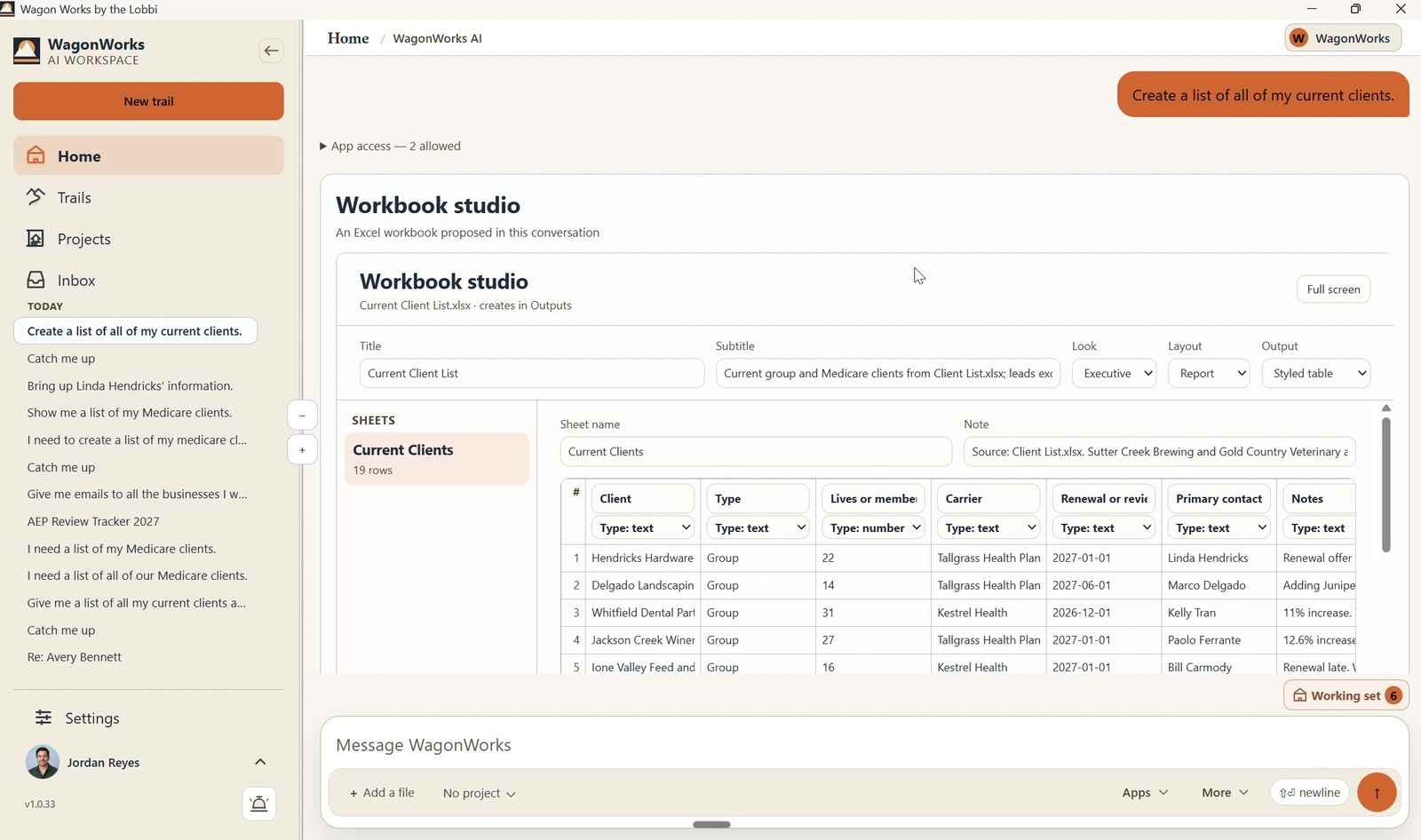
Ask for a renewal summary for the Whitfield Dental Partners review. WagonWorks builds a sectioned Word document from your files and saves it to your SharePoint.
LIMITIt summarizes your files. It does not quote premiums or recommend plans. Check every number against the carrier's documents.
Screenshot: WagonWorks v1.0.33 · Workbook studio building an Excel file
REAL CAPTURE · WagonWorks v1.0.33 · Workbook studio: the same studio, building an Excel file · demo data, fictional names
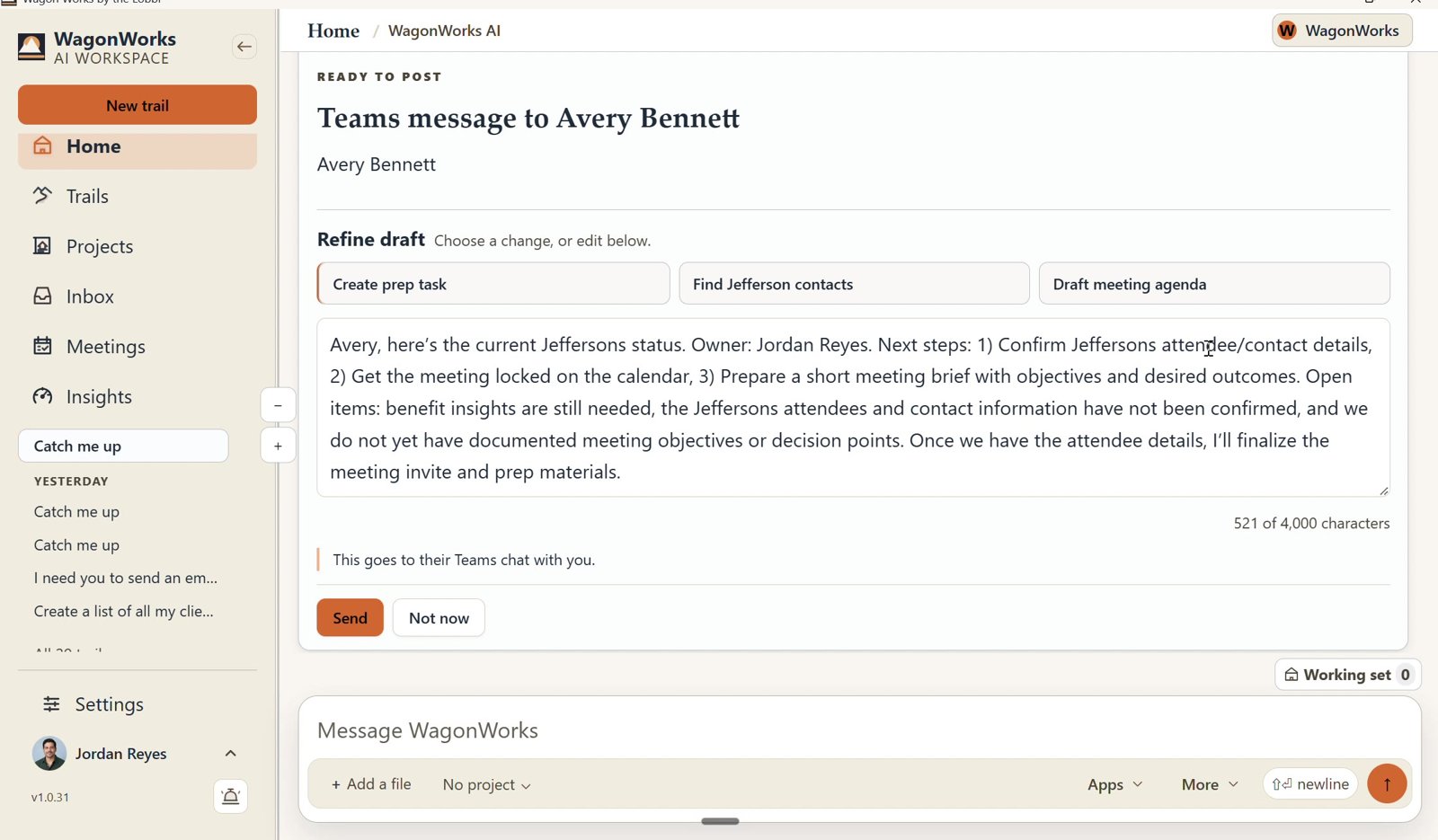
Screenshot: WagonWorks v1.0.31 · Ready to post: Send or Not now
REAL CAPTURE · WagonWorks v1.0.31 · Ready to post: Send or Not now · demo data, fictional names
YOU APPROVE. EVERY TIME.

It drafts the follow-up. Nothing goes out until you say so.

A Ready to send card shows the recipient and a draft you can edit, and tells you plainly: "It sends from your mailbox, as you." Choose Send or Not now.

LIMITApproval is yours, and so is what you send.
It also turns a sentence into a Planner task. "Call Walt and June Peterson about their annual review." You confirm the details before it's added.
Try it on this week's renewals.
Free for 30 days, then $39 per seat per month. Cancel any time.
03

Built for your season

GROUP BENEFITS

A renewal comes in at 11%. The census is still missing. A client wants to add dental before open enrollment. WagonWorks keeps each thread, file and promise in one answer you can check.

MEDICARE

A client turns 65 and wants to keep her cardiologist. A couple wants their annual review. Annual Enrollment runs October 15 to December 7, and every call-back matters.

04

What stays with you

It only sees what you can already see.
It runs on each person's own Microsoft sign-in. If you can't open a folder today, you can't see it through WagonWorks.
Your files stay in your Microsoft 365.
New documents are saved in your own SharePoint. WagonWorks trains nothing on your files.
We don't collect your information.
WagonWorks works with what is already in your Microsoft 365. Nothing is copied into a WagonWorks database.
A person approves everything.
Every email, message, document and task is shown to you first.
Plans and coverage decisions stay with your licensed team.
WagonWorks does not quote, recommend plans, enroll clients or replace your agency management system.
05

Questions you will ask

Can it work with my clients' information?

Yes, if it's in your Microsoft 365. It works with the client emails, files and tasks your account can already open, under your own permissions. We don't collect or store any of it.

Where do my call recordings live?

In your Microsoft 365, the same as today. Teams recordings and transcripts stay in your own tenant under the retention settings you control. WagonWorks reads them; it doesn't copy or store them.

Does it work with my agency management system?

Yes, when your agency management system is connected to your Microsoft 365. Whatever reaches your Outlook, Teams, Planner, SharePoint or OneDrive, WagonWorks can use. Carrier portals are not connected.

Do I need to buy Microsoft 365 Copilot?

No. It runs on the Copilot Chat already included in Business Standard, Business Premium and Enterprise E3/E5. Business Basic on its own will not work.

What does it cost?

Free for 30 days, then $39 per seat per month plus tax, month to month. $0 is due today; a card is required at checkout. Cancel before the trial ends to avoid a charge.

NEXT STEP

You already know your clients. We just know the trail.

Free for 30 days, then $39 per seat per month. Cancel any time.
Keep reading: What it does · Pricing · FAQ